Posts

Image
This Social Security Scam That Gives Hackers Full Access to Your Computer. If you receive an email about your Social Security statement, proceed with caution, hackers are impersonating the Social Security Administration (SSA) to trick people into installing a remote access tool and handing over full control of their devices. How the Social Security phishing scam works It begins with an email that appears to come from the SSA with the message, "Your Social Security Statement is now available" and a prompt to download an attached document. The supposed statement is actually a ScreenConnect client, which grants remote control of the affected device. ScreenConnect is a legitimate remote support platform for IT pros to help users configure systems and resolve technical issues by allowing the same access as if they had your device in hand. Once hackers have control of your computer via ScreenConnect, they can use it for anything from installing malware to transferring files to ac...
Image
Don't Click If You See This Message On Your PC—It’s A Malware Attack and No Anti Virus Can Stop It. There’s a new type of attack targeting Windows PCs - ClickFix. ClickFix was first seen last year and works by using social engineering lures and fake error messages to trick users into copying, pasting and then running a malicious command in the PowerShell terminal on their PC. This then executes the attack. The command will access and then run a remote command which will ultimately install malware on the PC. The rest will be down to the objectives of the attack. According to security researchers, ClickFix is “a sophisticated form of social engineering, leveraging the appearance of authenticity to manipulate users into executing malicious scripts. These compromised websites are often carefully crafted to look genuine, increasing the likelihood of user compliance. Once the script is pasted and executed in the PowerShell terminal, it allows the malware to infiltrate the victim’s system...
Image
  Windows 10 End of Life on 14th October 2025 What Does Windows 10 End of Life Mean? When an operating system reaches its End of Life, Microsoft stops providing security updates, bug fixes, and technical support. While your Windows 10 devices will continue functioning after October 14, 2025, they will become increasingly vulnerable to cyber threats, software incompatibility, and performance issues. What to Expect After October 14, 2025 No More Security Updates – Without regular security patches, Windows 10 systems will become prime targets for cyberattacks, increasing the risk of data breaches and malware infections. Lack of Technical Support – Microsoft will no longer offer support, making it difficult to resolve software-related issues. Software Compatibility Issues – New applications and updates may not be optimized for Windows 10, leading to performance problems and functionality gaps. Compliance Risks – Many industries require businesses to use supported software to meet regul...
Image
 Be Careful of Fake Chrome Errors That Ask You to Copy & Execute a Code which is a Malware The campaign is being used by multiple threat actors, including the group behind a new attack called ClickFix, as well as those behind existing attacks like ClearFake. Well-known threat actor TA571 is also believed to be involved. Much like previous ClearFake attacks—which used website overlays to push visitors to install fake browser updates riddled with malware—the new threat causes a popup to appear on the screen, prompting users to resolve an issue with their browser. The instructions included in the fake Chrome error suggest that you click a “copy” button, and then paste a “fix” into Windows Powershell application—while running it as an Admin. This is exceptionally bad news, as it gives the instructions within the copied command complete access to your computer.
Image
 Voted Best of Apex Honored to be voted the best in the Category by Suburban Living - Apex. Thank you to this great community and happy to be part of it.

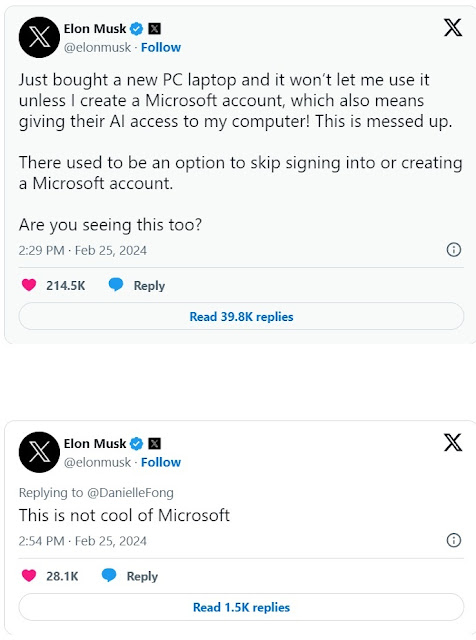
Elon Musk felt it's not cool to log in to Windows with only Microsoft Account

Image
 Do you feel the same ??? We can help.      If you feel that it's not cool to use Microsoft Account to log in to your computer, we can help. We can help you setup a new computer without you logging in to Microsoft Account and avoid some hazardous situations like Hard Drive Encryption, Automatic uploads of your personal data to One Drive etc.

Building a new PC for the first time ?

Image
  Building a new PC for the first time ? Don't make these mistakes. Selecting the wrong Power Supply Not paying attention to various components compatibility Not checking components before installing them in the case Not paying attention to Fans placement & orientation Missing installation of I/O shield Not properly installing the standups and properly securing the motherboard

LOL

Image
 

Computer Running Slow ?

Image
What to do with 2 - 4 years old computer running slow ? Time and again we encounter this question at our shop. First thing we do is run a small diagnostic in their presence and try to check the SMART status of the hard drive. 80% of the time we will see many attributes which are way over then normal values. To name a few, Read Errors, Write Errors, Load Unload Cycle Counts, Write Errors, Command Time Out etc. Bottom Line is these factors bring down the hard Drive Read/Write performance substantially making whole computer use very slow. Most of us use the computers these days for browsing on the Internet and that required huge amount of data to be downloaded, written on to our hard drive and then rendered to be displayed where our Internet speed plays role in the 1st Step, Hard Drive Performance the 2nd Step and the Processor & Memory the 3rd Step. So if you have a good internet connection & reasonably good specification on your processor & memory and still it's slow the...

Truth of Skilled People

Image
 

How to Get Best Wifi Performance

Image
How to Get Best Wifi Performance Placement of your wifi router largely affects the connection No matter which provider you choose to go with, there are several things you can do at home to keep your connection running smoothly. Specifically, where you place your wifi router has a big impact on the quality of your wifi connection. WHERE TO PUT YOUR ROUTER We recommend to keep the wifi router standing upright and off of the floor, such as on a shelf or table, keeping it off of other equipment to reduce interference and in the center of the house. WHERE NOT TO PUT YOUR ROUTER One should never place their router near. Other wireless devices Microwaves Television Bluetooth devices The corner of a basement or far-off corner Baby monitors Cordless phones Inside or behind cabinets and furniture Anything that could block modem vents Metal building materials Concrete building materials Glass building materials Depending on the layout of your home, it may be difficult to avoid every single one of...

Are You the Chosen One ?

Image
71M Compromised Email Accounts Listed Online, How to Check Yours Find out if your email address is one of the nearly 71 million in the recent Naz.API data breach dump.  https://haveibeenpwned.com/ 

Each Challenge is Different

Image
 What ??? Like Rick of Pawn Star says, you don't know what comes in through the door, We too are always challenged with what comes through the door. Laptop been through the accident came in for data recovery. Lucky for the customer, we could successfully recover the data from this crushed piece of once a laptop. These kinds of accidents can really save one's skin if proper data backup strategy is implemented. We are here to help for any such situations and to guide you to establish Bullet Proof Backup.

FBI Warning

Image
New Warning from FBI FBI warns of search engine ads pushing malware, phishing. The FBI warns that threat actors are using search engine advertisements to promote websites distributing ransomware or stealing login credentials for financial institutions and crypto exchanges. In today's public service announcement, the federal law enforcement agency said threat actors purchase advertisements that impersonate legitimate businesses or services. These ads appear at the top of search result pages and link to sites that look identical to the impersonated company's website. "When a user searches for that business or service, these advertisements appear at the very top of search results with minimum distinction between an advertisement and an actual search result," warns the FBI. "These advertisements link to a webpage that looks identical to the impersonated business's official webpage." When searching for software, the FBI says advertisements will link to websit...

Geek Squad Paypal Scam

Image
Scammers try it on me So this morning my Gmail inbox had a genuine email from PayPal that said someone has requested money as attached. Since it was from PayPal, Gmail spam filters didn't block it and as you can see it's legit email. The sender, reason & the content of it were suspicious. So be careful with this new kind of campaign from the scammers who are always trying new tactics to scam the innocents.

How to Fight Planned Obsolescence & Save the Planet ???

Image
What to do with old functioning hardware ? In todays world we see many products which are being phased out/discontinued/declared vintage for reasons best we all know - Corporate Greed. Be it Apple, Microsoft, Intel and so on, they all discontinue old models and release new one with the new Operating System which would work only with the new hardware. Has anyone ever thought of environmental impact of making old hardware useless ? We at CompuGuru have always worked with clear objective of salvaging any old piece of hardware and stopping it from going to landfill. So what we do to use such discontinued hardware?? Well there are other people who think alike and develop workarounds to these situations and we are happy to join hands with them. We provide various services to breath life in to such old hardware, bringing them up to date with the latest Operating Systems be it old Mac or PC. What we offer is upgrading them saving all your data & making them at par with the latest models fo...

Neighborhood Favorite Award Goes To..

Image
We are honored to be voted a 2023 @Nextdoor Neighborhood Fave. Thank you to our neighbors! We are honored to be voted a 2023 @Nextdoor Neighborhood Fave. This award means so much for our business and helps us continue to grow in our community!
Be Careful !!! - Sneaky Amazon Google ad leads to Microsoft support scam. https://www.bleepingcomputer.com/news/security/sneaky-amazon-google-ad-leads-to-microsoft-support-scam/
Simple Cybersecurity Rules for Individuals 1. Don't Panic - If you get an email alerting you that your credit card's about to be charged $480 to renew your non-existent Purchase or that your computer is infected with ransomware, you might be tempted to call the toll-free number in that email. Simply try to remember and ask around in the household or relatives & friends about such a thing but DO NOT CALL that number. Scammers thrive by making people panic. Take the time you need to figure out what the real threat is before you do anything. 2. Don't Open Unknown Attachments - Many potential security threats arrive in the form of email attachments. Sometimes they're executable files, but these days they're just as likely to be Word documents, PDFs, or HTML files. They might be capable of running exploit code, or they might be simply an attempt to convince you to enter credentials for an email or bank account. 3. Don't Click Unsolicited Links in Email or Text - ...
How to Protect Yourself from Cyber Threats. 1 - Use Multi Factor Authentication and Passkey if available. 2 - Choose Harder to Guess Passwords and best to Use Password Manager for Unique Passwords. 3 - Don't Log In to Sensitive Accounts over Public WiFi. Best to use    Mobile Data or Dedicated Apps on Phone / Tablet. 4 - Freeze Your Credit against Financial Frauds. 5 - Use Credit Cards with Chips and not Debit Cards. 6 - Set Transaction Alerts to Track Credit Card Charges. 7 - Get Creative with Security Questions to Reset Passwords. Share with Your Loved Ones to Keep Them Safe Online and Follow for More such tips.